A yearly course
- Taught once a year, far from the websites and files it's about
- Easy to click through without reading
- What it teaches fades within months
- Measures who finished it, not what changed
Your rules, in your own words, shown in Chrome and Edge just as a user is about to break one. Users meet the rule where it applies, and the audit log shows what they did next.
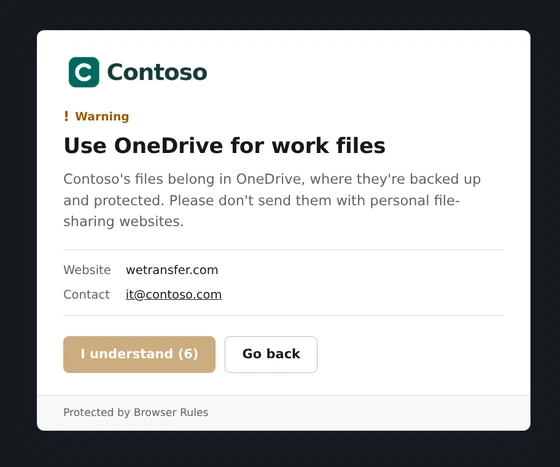 Real screenshot
Courses teach the rules once, then users meet them months later, in a hurry. A short message at that moment reminds them of the rule before the mistake, not after it.
Yearly training made no measurable difference to clicks on test phishing emails, across 19,500 hospital staff over eight months. UC San Diego, 2025
Test phishing emails with a short warning got 64% fewer clicks, across more than 14,000 staff over 15 months. ETH Zurich, IEEE Symposium on Security and Privacy, 2022
of UK businesses gave staff cyber security training in the last year. Phishing was by far the most common attack. Cyber Security Breaches Survey, 2026
"No training package, including phishing simulations, can teach users to spot every phishing attempt."
National Cyber Security Centre
Phishing tests send staff fake emails, then show a lesson to anyone who clicks. Large studies found they do little, and they cost trust.
The lesson after clicking a test email made almost no difference. Three in four staff spent a minute or less on it. UC San Diego, 2025
Staff shown a lesson after clicking a test weren't more resilient to phishing, and some became more likely to fall for it. ETH Zurich, 2022
"Phishing simulations also erode trust between employees and security." Staff who fear trouble don't report their mistakes. National Cyber Security Centre
Browser Rules shows the lesson on the real page, when the rule applies. Nobody is caught out, and the audit log shows what users did next.
Each is a default policy or a ready-made rule in the admin console. Use this wording, or write your own.
A fake page can copy how a sign-in page looks, but not its address. The reminder shows the address, so users learn to check it.
Attackers send a code and ask users to enter it, which signs the attacker in. Users learn to enter only codes for sign-ins they started.
A fake app asks an admin to approve it, then reads the organisation's email and files. Admins learn to check the app first.
Fake CAPTCHAs and help pages ask users to paste a command into Run or a terminal. No real website needs that.
Macros run code when a document opens. Users learn to enable them only in documents they expected.
A long paste into an AI tool can carry customer or personal data. Users learn what your AI policy allows, as they paste.
Each starts from a ready-made rule in the admin console. Choose who it's for, write your message, and publish.
For their first few months, a group policy warns them before personal webmail and file-sharing websites.
Warn on AI tools you haven't approved, and before a long paste or a file upload into one.
The audit log shows who carried on past a warning. Put them in a group, and give them a firmer sign-in warning they must answer.
Changing a rule? Warn for a month first, so users learn the new rule before it stops them.
Every message shows your logo, your wording and who to contact. Give each kind its own look: here, red for a block, amber for a warning, and your own colour for guidance and reminders.
Write each message yourself, with a link to your policy and who to contact. Add your logo, and give each kind of message its own colours and place on the page, from a slim bar to a full page.
Warn where judgement applies, ask users to confirm where they should stop and think, and block where the rule is firm.
For the warnings that matter most, carrying on works only after 3, 5 or 10 seconds, so users read the message first. Going back works at once.
Aim a rule at new starters, one department or the users who carried on past a warning, and leave everyone else alone.
The sign-in reminder can show once per website, or again after 30 or 90 days, so it stays worth reading.
The policy tester shows the message a user would see, before anyone sees it. Policy tester
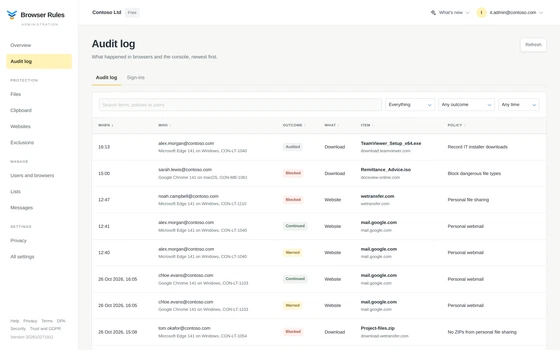 Real screenshot
More tips, and the research behind them, in our article Security awareness training in the browser.
One or two sentences. A warning gets a few seconds of attention.
"Use OneDrive for work files" teaches more than "Not allowed".
A link in the message takes users to the full rule when they want it.
Too many warnings teach users to click past them. Watch the audit log for warnings everyone ignores.
Keep teaching users how to spot and report phishing. Messages in the browser reinforce the rules you teach, where they apply.
The sign-in reminder shows on every sign-in page you don't trust, genuine or not. It asks users to check, and leaves the decision to them.
With the extension installed. Other browsers and email apps aren't covered. What it can and can't protect